The Fastest Way to Build Reliable PDF Data Extraction
Discover how to achieve fast and reliable PDF data extraction with a schema-first approach and intelligent processing techniques.

The fastest reliable path to production-grade PDF data extraction is a schema-first API or SDK, with hybrid intelligent document processing (IDP) reserved for scanned pages or layout-heavy documents. Define the output contract before you write a single line of parsing code. For clean, low-variance documents, a deterministic parser will get you structured JSON in hours. For scanned invoices, contracts, or multi-column reports, route those pages to a hybrid pipeline that combines local parsing with an AI backend, and standardize on JSON with bounding boxes as your primary output format so both humans and downstream systems can trace every field back to its source.
Start with three moves:
-
Pull 50 to 100 representative documents and sort them by layout variance.
-
Define your schema first (field names, types, confidence scores) before touching extraction logic.
-
Run a proof of concept against that sample set before committing to a single vendor or library.
Pro Tip: Treat schema design as the actual deliverable of week one. Everything else, OCR settings, table detection, model choice, is replaceable. A brittle schema is not.
Key Takeaways
Schema-first design combined with hybrid routing, local parsing for simple pages and AI backends only for complex ones, is what separates production-grade PDF extraction from a fragile prototype.
| Point | Details |
|---|---|
| Start with schema, not tooling | Lock field names, types, and confidence scores before choosing a library or API. |
| Match approach to document variance | Use templates for stable forms, hybrid ML/IDP for unstructured or scanned documents. |
| Route selectively, not universally | Send only complex tables and scans to AI backends; keep simple pages on local parsing. |
| Measure field-level, not just overall, accuracy | Track precision and recall per field, plus OCR CER and TEDS for tables. |
| Build the correction loop early | Feed human review corrections back into the pipeline to improve accuracy over time. |
| gamgi builds this as a production system | gamgi runs an operational audit first, then delivers a schema-first, model-agnostic extraction pipeline in weeks. |
Table of Contents
Core Approaches to PDF Data Extraction
Four strategies cover almost every document you’ll encounter, and picking the wrong one for your document mix is the single most common reason extraction projects stall.
-
Template or deterministic parsing. Best for forms with fixed layouts: tax documents, standardized applications, purchase orders from a single vendor. You define field positions once and reuse them. Fast, cheap, nearly zero hallucination risk, but it breaks the moment a layout shifts.
-
Rule-based extraction. Works well for semi-structured sets, think invoices from a known group of 20 suppliers, where you can write pattern-matching logic (regex, keyword anchors, positional heuristics) that tolerates minor layout drift without a full model.
-
ML and IDP-driven extraction. Necessary for unstructured or highly variable documents, like contracts or medical reports, where Intelligent Document Processing classifies content and enriches it with structured fields rather than just pulling raw text.
-
Hybrid: local parsing plus selective AI routing. The pattern most production teams converge on. Simple pages get parsed locally and cheaply; only complex tables, scans, or ambiguous layouts get routed to an AI backend.
Before you commit, run a quick checklist: How much does document layout vary? What’s your monthly volume? Do you need sub-second latency or is batch processing fine? Does data residency or privacy policy restrict cloud calls? Answering these four questions upfront narrows the field faster than testing five libraries.
What to Require From an SDK or API for Document Parsing
Not every PDF library is built for production. Before adopting one, check it against a short list of non-negotiables.
-
Structured output formats, specifically JSON with element-level bounding boxes, CSV or XLSX for tables, and Markdown for retrieval-augmented generation (RAG) chunking.
-
Multiple OCR modes, including a fast mode for clean scans and a heavier mode for degraded or handwritten documents.
-
Both CLI and server SDK options, so the same extraction logic works in a local script during development and inside a containerized service in production.
-
Webhook or event support, so downstream systems get notified the moment extraction completes instead of polling.
-
Language bindings that match your stack. Python dominates rapid prototyping thanks to libraries built specifically for automating PDF extraction, but production teams often need Java, Go, or Node bindings for the actual service layer.
-
On-prem or self-hosted deployment options for sensitive documents, alongside cloud APIs for everything else.
-
Audit logging and data residency controls, since document extraction often touches regulated data (financial records, health information, contracts).
Cloud platforms like Google’s Document AI bundle custom extractors with built-in OCR and charge per page processed, which makes cost modeling straightforward once you know your monthly volume. Open-source options like OpenDataLoader PDF give you hybrid modes out of the box: local parsing for most pages, AI routing only when a page’s complexity crosses a threshold.
Designing a Schema That Downstream Systems Can Trust
A schema-first approach means downstream teams know exactly what shape the data will take before extraction even runs, and that predictability is what makes automation reliable instead of fragile.
Your base schema should include, at minimum: document_id, page_number, field_name, value, bbox (bounding box coordinates), and confidence_score. That last field matters more than teams expect. An extraction pipeline that returns a value without a confidence score forces every downstream consumer to trust blindly.
A few practical rules:
-
Version your schema explicitly (
v1,v2) so a field addition never silently breaks an existing consumer. -
Make new fields optional by default; only promote a field to required after it’s proven stable across a few hundred documents.
-
Route anything below your confidence threshold, commonly 85 to 90%, to a human review queue rather than pushing it downstream automatically.
-
Log every human correction back into a training or rules-update pipeline, not just a spreadsheet nobody revisits.
Pro Tip: Build the human review queue before you need it. Teams that bolt on review after a bad batch ships to production spend weeks rebuilding trust with the business side that got burned.
Getting OCR and Table Extraction Right
Scanned PDFs and dense tables cause most of the extraction failures teams actually experience in production, and most of those failures trace back to skipped preprocessing.
-
Preprocess before you OCR. Set DPI to at least 300, deskew rotated scans, and denoise before running any text recognition. Skipping this step is the single most common reason OCR accuracy looks fine in testing and falls apart on real scanned mail.
-
Handle tables with a layered strategy. Start with border detection for bordered tables, then use spatial clustering (grouping text by proximity) for borderless ones. Layout algorithms like XY-Cut++ help preserve column order in multi-column documents, which matters enormously for reading order.
-
Route only genuinely hard tables to AI backends. Reserve the more expensive hybrid mode for merged cells, nested headers, or tables with no visible borders, not every table in the batch.
-
Preserve bounding boxes through the whole pipeline, especially if the output feeds a RAG system. A citation without a bounding box is a citation nobody can verify.
Common anti-patterns worth naming directly: running OCR at default DPI on a low-quality scan, treating every table the same regardless of complexity, and discarding layout metadata the moment text gets extracted. Each one is cheap to fix early and expensive to fix after launch.
How to Test and Validate an Extraction Pipeline
You cannot improve what you don’t measure, and extraction pipelines fail quietly if nobody’s tracking field-level accuracy.
-
Build a test corpus that mirrors real document diversity, not just your cleanest samples. Include scanned copies, rotated pages, and at least a few genuinely ugly outliers.
-
Track field-level precision and recall separately for each field type, not just an overall accuracy score that hides which fields are actually failing.
-
Measure OCR quality with Character Error Rate (CER) and table extraction quality with TEDS (Tree Edit Distance-based Similarity), the standard metric for structural table comparison.
-
Track end-to-end success rate: the percentage of documents that flow through with zero human intervention.
-
Run regression tests on every pipeline change, since feeding human corrections back into the model over time is what actually drives accuracy up, not one-time tuning.
Most teams that skip continuous regression testing discover their accuracy silently degraded only after a downstream system starts rejecting records.
Deployment Patterns That Balance Cost, Speed, and Compliance
Three architectures cover most production needs. An SDK embedded inside a microservice works when documents aren’t sensitive and volume is moderate. An on-prem agent handles cases where documents can’t leave your network, contracts, medical records, anything under strict data residency rules. A hybrid routing layer sits in front of both, sending simple pages to the cheap local path and complex ones to an AI backend only when needed.
-
Use queues and worker pools to smooth throughput spikes instead of scaling API calls linearly with document volume.
-
Batch low-priority documents to cut cost; process time-sensitive ones (like same-day invoices) individually.
-
Cache extraction results for duplicate or near-duplicate documents, common in recurring contracts and monthly statements.
-
Sample a percentage of automated extractions for manual audit even after the pipeline is stable, since drift happens quietly.
Where Extracted PDF Data Actually Gets Used
Extraction only matters once the output feeds something real, powering AI automation workflows that drive agency growth.
-
Invoice and accounts-payable automation. Extraction pulls line items and totals, a validation layer checks them against purchase orders, then the record flows into the ERP system with no manual entry.
-
Retrieval-augmented generation (RAG) pipelines. JSON or Markdown output gets chunked and indexed, with bounding boxes preserved so every AI-generated answer can cite the exact source location, a pattern covered in more depth in how AI agents fit into business workflows.
-
Compliance and audit reporting. Auto-tagging produces Tagged PDFs with a full audit trail, so regulators or internal auditors can trace exactly which fields came from which source document.
Each use case demands a slightly different schema and confidence threshold, which is exactly why schema-first design pays off before you scale to a second use case.
How gamgi Approaches Production PDF Extraction Projects
Most extraction projects fail before a single model gets trained, they fail because nobody mapped which documents actually drive value. gamgi starts every engagement with an operational audit: sampling real document sets, mapping where manual data entry is actually costing time, and recommending what not to build alongside what to.
From there, delivery moves fast because the schema gets locked early and the pipeline stays model-agnostic rather than betting the whole system on one vendor.
The teams that get this right treat the audit as the actual engineering work, not a formality before the “real” build starts. Skipping it is how projects end up automating the wrong document.
-
Incremental proof-of-concept to production, typically weeks rather than quarters, using schema-first integration.
-
Security and auditability built in from day one: data residency, complete audit logging, human oversight on consequential decisions.
-
Model-agnostic architecture, so the pipeline isn’t locked to a single AI vendor’s roadmap.
Case work like LexAlert’s automated legislative monitoring shows this pattern applied to a real document-heavy workflow for a law firm.
Comparing Popular PDF Extraction Tools and Libraries
No single tool wins across every dimension, cost, accuracy, deployment flexibility, so the right pick depends on your document mix and constraints.
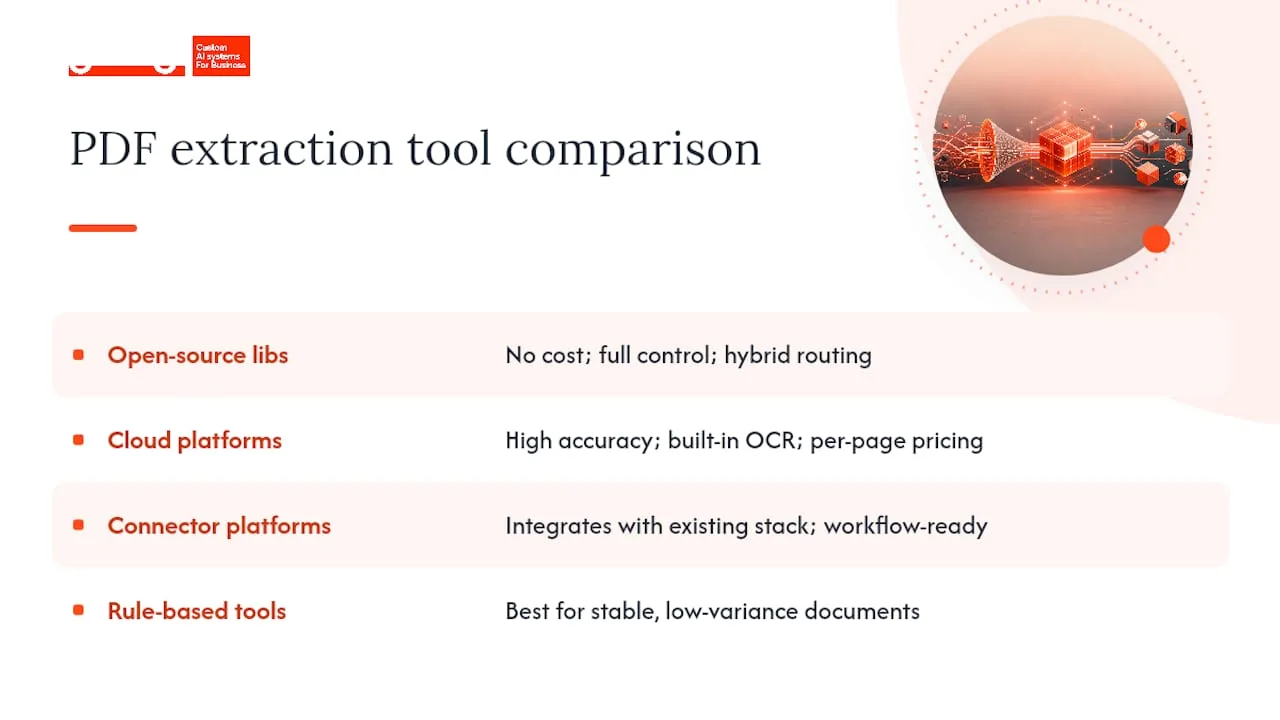
Open-source libraries (Python’s PDF ecosystem, OpenDataLoader PDF, and similar projects) cost nothing upfront and give full control over the pipeline. OpenDataLoader specifically supports hybrid modes, routing complex pages to AI backends while keeping simple pages local, and outputs both JSON with bounding boxes and Markdown for RAG use cases. The tradeoff: you own the infrastructure, scaling, and maintenance.
Cloud document AI platforms, like Google’s Document AI, offer custom extractors with built-in OCR and per-page pricing. You get high accuracy with minimal labeling effort, but you’re sending documents to a third-party service, which matters if data residency is a constraint.
Connector-based platforms, such as Nitro’s PDF services integrated through Microsoft’s connector ecosystem, suit teams already embedded in that stack who want extraction wired directly into existing workflows without building custom infrastructure.
Rule-based and template tools remain the right call for genuinely stable, low-variance document sets, don’t reach for machine learning when a positional template solves the problem in an afternoon.
The practical split: open-source and hybrid tools win on cost and control for teams with in-house engineering capacity; cloud platforms win on speed to a working prototype; connector platforms win when the surrounding ecosystem is already decided.
What the Research Actually Supports
Most advice on document processing still treats OCR quality as the bottleneck. It isn’t, not anymore. The bottleneck is schema design and the decision about which pages deserve an expensive AI call versus a cheap local parse. Teams that skip straight to “let’s use an LLM for everything” end up with slower, costlier pipelines than teams that route intelligently.
The conventional wisdom oversells full automation and undersells the review queue. Confidence scores and human correction loops aren’t a fallback for a weak pipeline, they’re the mechanism that makes the pipeline improve at all. A system with no correction loop stays exactly as accurate on day 300 as it was on day one.
Prioritize in this order: lock the schema, sample real documents before choosing a tool, then decide where hybrid routing earns its cost. Everything else, which library, which OCR engine, is a swappable implementation detail once those three decisions are made.
Turn Extraction Into a Working System, Not a Prototype
Reading about schema design and hybrid routing is one thing. Getting a pipeline that actually survives contact with your real document backlog, the scanned invoices, the inconsistent contracts, the reports nobody standardized, is another. gamgi builds exactly that: production-grade document intelligence systems designed around how your operation actually works, integrated into the tools you already run, with no rip-and-replace.
Every engagement starts the same way this article recommends starting a pipeline: an audit of your actual documents and workflows to find where extraction creates the most value, including an honest recommendation of what not to build. From there, the same team that ran the audit designs, builds, and ships the system, typically in weeks, with data residency, audit logging, and human oversight built in from day one. See what gamgi builds in its document intelligence capabilities, or book an audit to map where extraction would pay off fastest in your operation.
Frequently Asked Questions
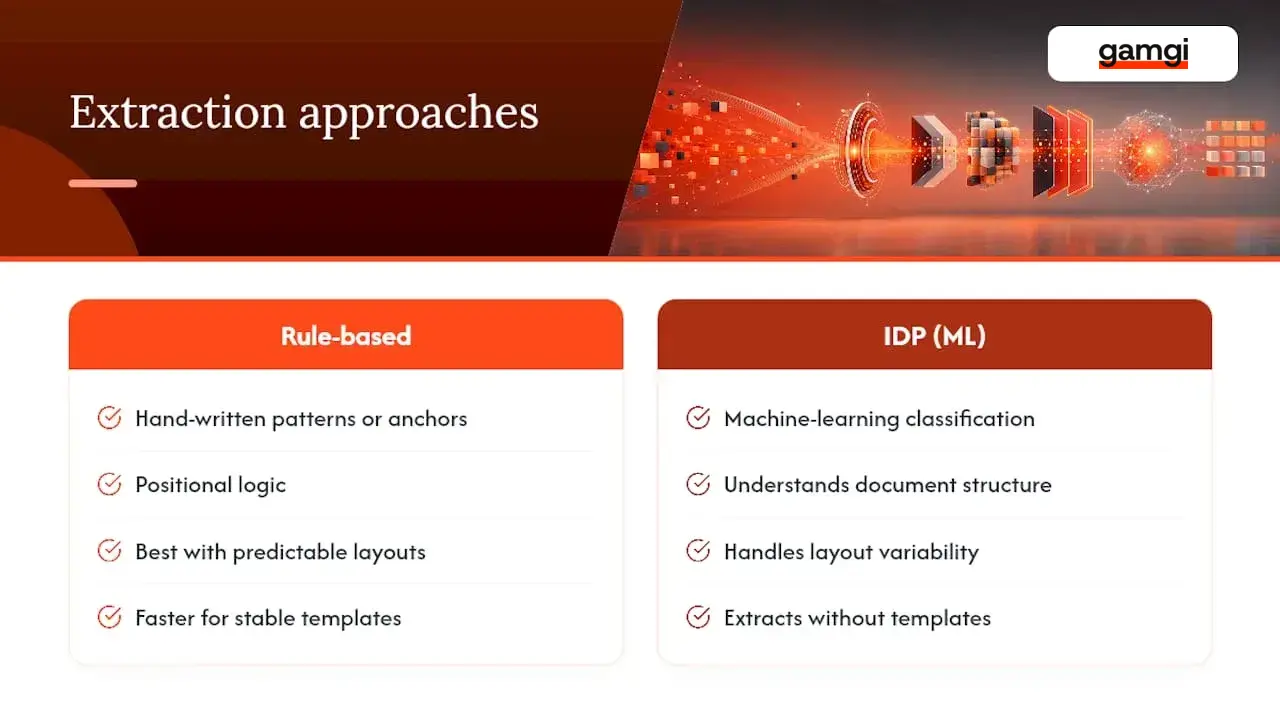
What’s the difference between rule-based extraction and IDP? Rule-based extraction relies on hand-written patterns, keyword anchors, or positional logic, and works well when documents follow a predictable structure. IDP uses machine learning to classify content and understand document structure, which handles variability that rules can’t anticipate.
Do I need OCR if my PDFs are already digital, not scanned? No. Digital, text-based PDFs already contain extractable text layers. Reserve OCR for scanned images, faxes, or photographed documents where no text layer exists.
How accurate does PDF data extraction need to be for production use? It depends on the use case, but most teams set a confidence threshold (often 85 to 90%) below which a record routes to human review rather than flowing automatically downstream. Full automation accuracy targets vary by document type and business tolerance for error.
Can AI extract data from PDFs without any manual template setup? Yes, for unstructured or highly variable documents, ML and IDP approaches classify and extract fields without a pre-built template. For stable, repetitive layouts, a simple template is often faster and cheaper to deploy.
What output format works best for feeding a RAG system? JSON with element-level bounding boxes, or Markdown with preserved headings, both keep the document’s structure and location metadata intact, which supports accurate citations in AI-generated answers.