Event-Driven Automation: How It Works and How to Roll It Out Safely
Unlock the power of event-driven automation. Discover how it speeds up resolutions, reduces errors, and minimizes alert fatigue effortlessly.
Event-driven automation runs predefined workflows the moment a system detects a condition, an if-this-then-that logic that fires automated diagnosis or remediation without a human clicking a button.
The payoff shows up in three places. Teams see faster mean time to resolution, fewer manual errors from tired on-call engineers doing 2 a.m. triage, and less alert fatigue because normalizing and enriching events before routing them cuts the noise before it reaches a human.
-
Reduces MTTR by acting the instant an event fires, not on the next check-in cycle
-
Cuts human error from repetitive, low-judgment remediation tasks
-
Lowers alert fatigue through suppression and enrichment before automation kicks in
Pro Tip: Event-driven automation isn’t a replacement for observability or orchestration platforms. It’s the layer that turns what they detect into something that actually happens without waiting on a person.
Key Takeaways
Event-driven automation reduces MTTR and human error only when events are normalized, enriched, and tested against real historical data before remediation goes live.
| Point | Details |
|---|---|
| Definition | Event-driven automation runs predefined workflows the instant a system event occurs, not on a schedule. |
| Enrichment first | Normalize and enrich events with correlation IDs and runbook links before automating any response. |
| Guard against loops | Use origin filters and max chain depth to stop an automated action from re-triggering itself. |
| Test before production | Replay historical events and run digital-twin simulations before enabling any remediation live. |
| Start audit-first | gamgi maps operations before building, then ships tested automations integrated into the client’s existing stack. |
Table of Contents
What Is Event-Driven Automation Architecture?
Every production system follows roughly the same shape: an event producer generates a signal, a transport layer moves it, a normalization step cleans and enriches it, a rulebook or workflow engine decides what to do, and an execution layer carries out the action while logging what happened.
That five-stage pipeline is what separates event-driven automation from cron jobs and nightly batch scripts. Schedule-based automation runs on a timer regardless of system state. Event-driven automation runs the instant a condition is true, which is why it handles incidents, autoscaling, and security responses far better than anything on a clock.
-
Producers: monitoring alerts, application logs, webhooks, cloud storage notifications, CI/CD pipelines
-
Transport: message buses like Kafka, managed services like Google Cloud’s Eventarc, or direct webhooks
-
Normalization: converting raw payloads into a common schema, often CloudEvents
-
Engine: a rulebook or workflow tool like Argo Events that evaluates conditions and dispatches actions
-
Execution and observability: the action itself, plus logging so you can trace what fired and why
How Do the Core Components Work Together?
Each stage in that pipeline carries its own trade-offs, and getting them wrong is where most automation projects quietly fail.
Event sources matter because not all signals are equal. A monitoring alert about CPU saturation is high-value; a debug log line firing every second is noise that will drown your engine. Storage notifications and CI triggers tend to be reliable and low-volume, which makes them good starting points.
Transport choice is a real engineering decision, not a default. Kafka gives you durability and ordering guarantees at the cost of operational overhead. Webhooks are simple and fast but fragile if the receiver goes down mid-delivery. Managed pub/sub services split the difference, though Eventarc’s CloudEvents delivery comes with real limits around argument size and a 24-hour deduplication window that you need to design around, not discover in production.
Normalization and enrichment are where alert fatigue either gets solved or gets worse. Attach a correlation ID, a runbook link, and service ownership metadata to every event before it reaches your rulebook, and triage becomes a lookup instead of an investigation.
-
Require dedup and idempotency at the engine level, not bolted on later
-
Look for wait-for-event support if your workflows span multiple asynchronous steps
-
Confirm retry and backoff behavior before you trust the engine with anything destructive
Pro Tip: If your engine can’t tell you why an action fired, don’t let it take that action in production yet. Enrichment data is what makes an automated decision auditable after the fact.
Which Events Should You Automate First?
Not every alert deserves a trigger. Pick events using four criteria: how much impact the failure has, how often it recurs, whether the fix is safely repeatable, and whether the remediation sequence is genuinely well understood.
A disk-space warning that always resolves the same way (clear temp files, restart a service) is a strong candidate. A vague “latency increased” alert with six possible root causes is not, at least not for full automation yet.
-
Score events by impact and frequency before writing a single rule; automate the high-frequency, well-understood ones first
-
Instrument for durable delivery so an event isn’t lost if a consumer is briefly down
-
Validate schemas on arrival and require signature-based authentication so a spoofed event can’t trigger a real action
-
Build in suppression, debounce windows, and flap detection so a flapping service doesn’t fire the same remediation forty times an hour
Pro Tip: Debounce windows are cheap insurance. A short delay before acting on a repeated event costs almost nothing in mean time to resolution and saves you from remediation storms.
How Do Rulebooks Differ From Playbooks?
A playbook is written for a human to read and execute step by step. A rulebook is written for a machine: conditions, actions, fallbacks, and escalation paths expressed as logic the engine evaluates without interpretation. The distinction matters because a rulebook has to handle every branch explicitly. There is no human judgment filling gaps at 3 a.m.
A well-built rulebook includes a condition block, a primary action, a fallback if that action fails, an escalation path to a human when confidence is low, and a human approval gate for anything with real consequence.
-
Require parallelism support if multiple independent checks need to run before a decision
-
Require wait-for-event capability for multi-step remediations that depend on a downstream response
-
Require idempotency and backoff policies so retries don’t compound a problem
-
Default to diagnostics-only for new automations; graduate to full remediation once you trust the signal
Argo Events illustrates the pattern well: it accepts more than 20 event source types and routes them into Kubernetes-native workflows, which is why it’s become a common reference point for teams designing their own rulebook logic even outside Kubernetes environments. The general lesson holds regardless of tool: keep remediation narrow and reversible until the data proves the rule is safe to widen.
How Should You Roll Out Event-Driven Automation?
Start with the smallest possible blast radius. Pick one low-risk, high-frequency event, automate only the diagnostic step first, and add remediation once you trust the pattern.
-
Unit test the rule logic in isolation before it ever touches a real event stream
-
Integration test against a staging environment that mirrors production topology
-
Replay historical events through the rule to see how it would have behaved on real incidents
-
Run a staging or digital-twin simulation to catch cascading effects before anything reaches production, a step Nokia’s engineering guidance treats as standard for validating remediations safely
-
Enable progressively behind a feature flag, watching automation success rate and MTTR before widening scope
-
Govern it: RBAC on who can edit rules, full audit logging on every action taken, and a documented human oversight gate for anything irreversible
PagerDuty’s guidance on staged rollout backs this up directly: suppress transient alerts and enrich events before you attempt end-to-end auto-remediation. Skipping that order is the single most common cause of automation projects that get shut off after one bad incident.
What Are Real-World Examples of Event-Driven Automation?
Incident auto-remediation. A monitoring alert fires on high memory usage. The event gets enriched with service ownership and recent deploy history, the rulebook checks whether a known-safe restart pattern applies, and if so it restarts the service and posts a summary to the incident channel. If not, it escalates to a human with the enrichment data already attached.
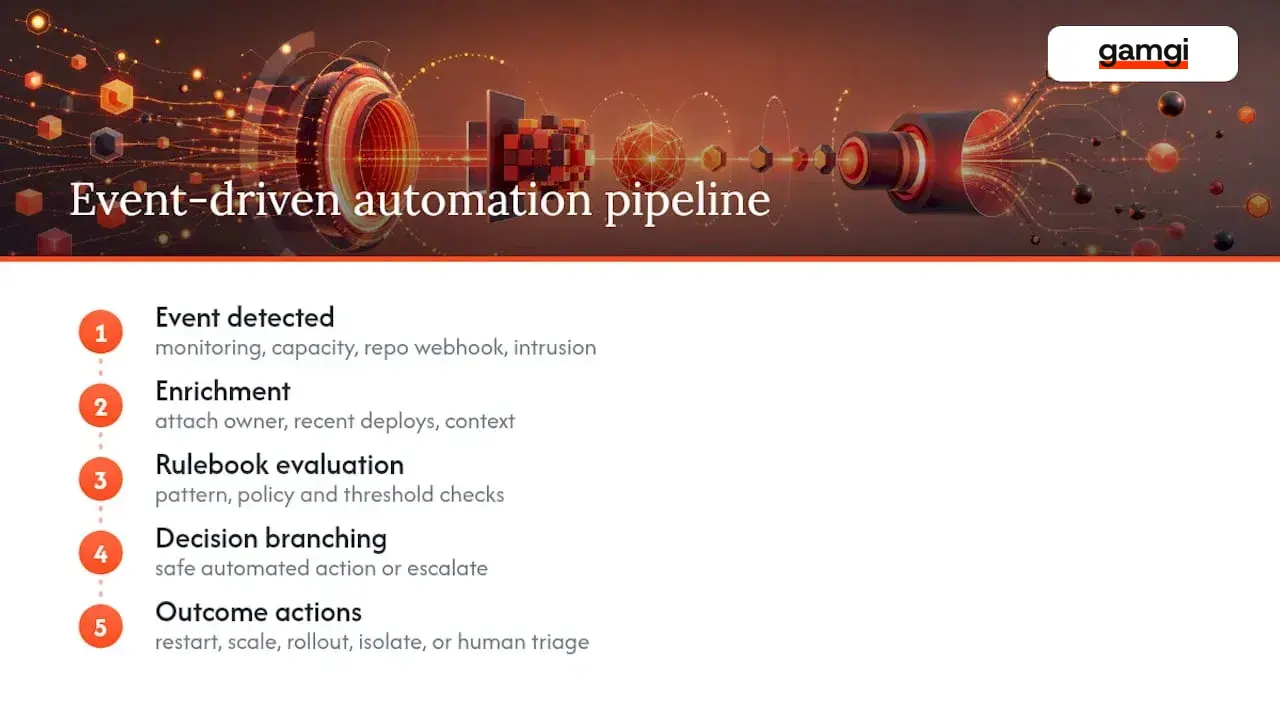
Autoscaling. A capacity event crosses a threshold, the engine checks current load against historical patterns, and provisions additional instances without a human approving each scale-out.
GitOps triggers. A webhook from a repository push kicks off a policy check; if it passes, the workflow triggers an automated rollout, and if a health check fails post-deploy, it triggers an automatic rollback.
Security containment. An intrusion detection event triggers automatic network isolation of the affected host, opens a ticket with full context, and logs every action for audit review.
What Are the Biggest Risks in Event-Driven Automation?
The most common failure mode is the automation loop: an action generates a new event that re-triggers the same rule, which fires the action again. Guard against this with origin filtering and a maximum chain depth, and design rulebooks with explicit filters that block a workflow from re-triggering itself.
Deduplication design also matters more than it seems. At-least-once delivery means your actions must be idempotent, or a duplicate event will double-execute a remediation.
-
Use cycle guards and origin filters on every rulebook, not just the risky ones
-
Test new rules against historical event data before enabling them live
-
Watch automation success rate, event latency, and error rate as your core health signals
-
Keep a manual approval gate on anything that can’t be trivially reversed
Pro Tip: If you can’t answer “what happens if this event fires twice in one second,” you’re not ready to put that rule in production.
How Does gamgi Approach Event-Driven Automation in Production?
Most automation efforts stall because building starts before anyone has mapped where automation actually creates value. gamgi reverses that: every engagement begins with an operational audit that identifies the highest-value automation opportunities, including a written recommendation of what not to build.
From there, the same team that ran the audit designs, tests, and ships the system, integrated into the stack the client already runs.
-
Operational mapping to find where automated response actually reduces MTTR, not just where it’s technically possible
-
Digital-twin and staged testing before any remediation touches production traffic
-
Full audit logging and human oversight gates on any automated action with real consequence
-
Offices in New York, London, and Lisbon, and recognition as a Top Generative AI Company by Clutch (2026)
Teams designing similar governance for agentic or workflow-driven systems can find useful grounding in MARFI’s work on secure automation and AI governance.
What Actually Matters When You Build This
Most guides on event-driven automation spend too much time on the engine and not enough on the enrichment layer, which is backwards. The engine is replaceable. Argo Events, Eventarc, a homegrown Kafka consumer: they all solve the same routing problem in slightly different ways. What actually determines whether your automation survives contact with a real incident is whether the event arriving at that engine carries enough context to make a safe decision.
Teams that skip straight to remediation because “the alert is obviously right” are the ones that get burned by a flapping service or a duplicate event storm. The unglamorous work of suppression windows, correlation IDs, and digital-twin testing is where the actual reliability comes from, not from picking a fancier orchestration tool.
The conventional advice to “automate the boring stuff first” is fine but incomplete. Automate the boring stuff you can also explain, after the fact, from an audit log. If you can’t trace why an action fired, you don’t have automation. You have an unaccountable black box that happens to work most of the time.
Ready to Move From Idea to Production Automation?
If you’ve read this far, you already know the hard part of event-driven automation isn’t picking a message bus. It’s figuring out which events are worth automating and building the enrichment and safeguards around them correctly the first time. That’s exactly where most in-house efforts lose months.
gamgi runs an operational audit before writing a line of code, mapping your event sources, existing monitoring, and workflow tools to find where automated response genuinely cuts MTTR, and where it would just add risk. The team that runs that audit is the same team that builds the rulebooks, tests them against a staging or digital-twin environment, and ships them integrated into the stack you already run, with audit logging and human oversight gates built in from day one. See what that looks like in practice in gamgi’s case studies, or explore the full capabilities behind the audit-to-production process. If you’re ready to find out where event-driven automation would create the most value in your environment, book an audit and get a written roadmap out of it.
Frequently Asked Questions
What is the difference between event-driven automation and orchestration? Event-driven automation decides when and why an action fires, based on real-time conditions. Orchestration coordinates the steps of an action once it’s triggered. Most production systems need both working together.
How does event-driven automation reduce alert fatigue? By normalizing and enriching events before they reach a human, suppressing transient or duplicate alerts, and only escalating what genuinely requires judgment. This is a core recommendation in PagerDuty’s guidance on event-driven automation.
What standards should I use for event payloads? CloudEvents is the most widely adopted standard for structuring event data consistently across producers, which makes it easier to route events into engines like Argo Events or cloud services like Eventarc.
Can event-driven automation cause its own incidents? Yes, most commonly through automation loops or duplicate-event storms. Cycle guards, origin filters, and idempotent actions are the standard mitigations.
Do I need a digital twin to test automation safely? It’s not strictly required, but replaying historical events against a staging environment that mirrors production topology is one of the most reliable ways to catch unsafe remediations before they run live.