Unstructured Data AI: How Enterprises Turn Files Into Insight
Discover how unstructured data AI transforms raw files into actionable insights, enhancing your business's decision-making and efficiency.

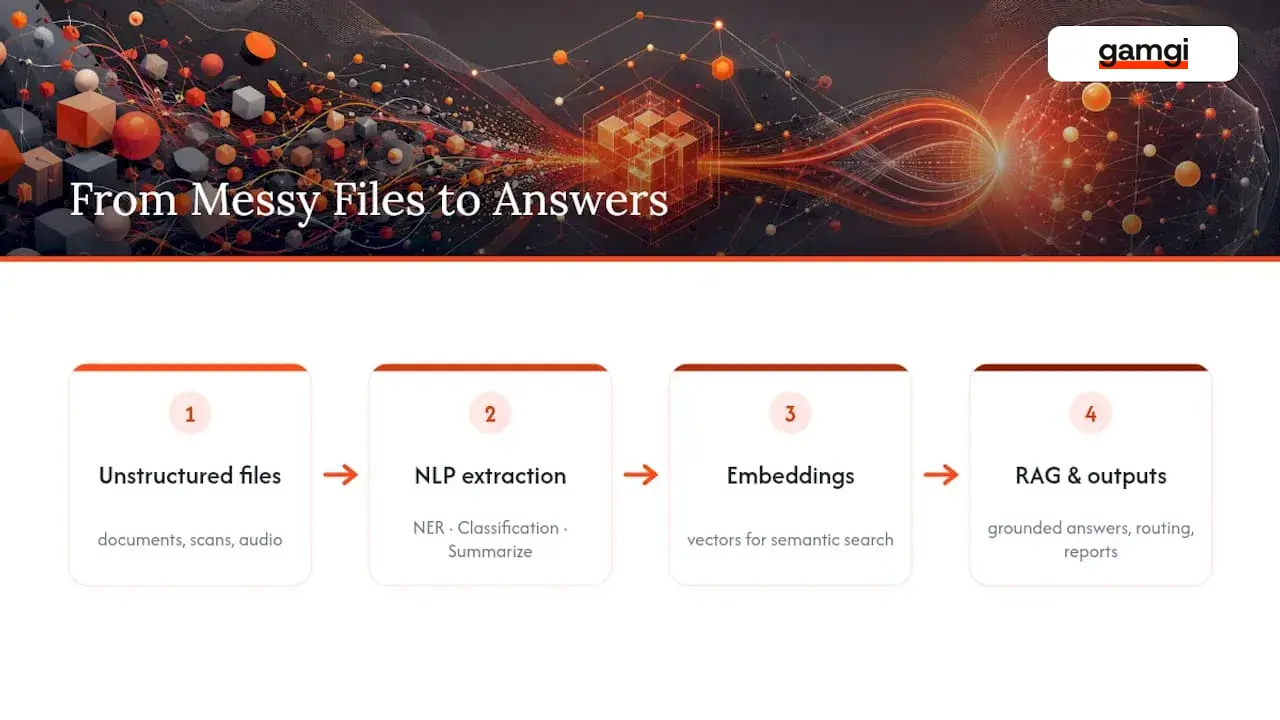
Yes, AI can extract reliable business value from unstructured data, but only when a company builds real preprocessing infrastructure underneath the model. The pattern that works: ingest and parse raw files, generate embeddings, retrieve relevant chunks through retrieval-augmented generation (RAG), and validate every output before it reaches a person or a downstream system. Skip the pipeline and you get a chatbot that hallucinates policy numbers. Build it, and you get a system that answers questions correctly, cites its source, and keeps working after the demo ends.
Unstructured data, meaning PDFs, emails, call recordings, scanned contracts, log files, and images, makes up roughly 90% of enterprise information, and most of it sits untouched because traditional databases can’t query it. AI changes that equation through a handful of proven methods:
- Natural language processing (NLP) for extraction, classification, and summarization of text
- Computer vision and OCR for scanned documents and images
- Speech-to-text models for call recordings and meeting audio
- Embeddings and vector search to make any of this content semantically searchable
- RAG to ground large language model answers in your actual company data instead of its training data
The single biggest risk isn’t model selection. It’s data quality and pipeline engineering. A well-chosen model fed garbage chunks produces garbage answers with total confidence.
Key Takeaways
Unstructured data AI succeeds when production-grade preprocessing, embeddings, and retrieval work together under strict validation and lineage controls, not when a model is simply pointed at raw files.
| Point | Details |
|---|---|
| Pipeline beats model choice | Preprocessing, chunking, and validation determine output quality more than which model generates the answer. |
| RAG grounds outputs in real data | Retrieval-augmented generation pulls from your vector database at query time, reducing hallucinated answers. |
| Chunking must match the use case | RAG needs meaning-preserving chunks; analytics dashboards need structured field extraction instead. |
| Lineage is your audit trail | Storing source ID, page span, and transformation run ID with every chunk makes outputs traceable and correctable. |
| gamgi runs the audit before the build | gamgi maps operations end to end first, then designs and ships production systems integrated with existing tools, live in weeks. |
Table of Contents
- What Is Unstructured Data in an Enterprise Context?
- The Main Types of Unstructured Data Worth Automating
- How AI Actually Extracts Value From Messy Files
- Building the AI-Ready Pipeline, Step by Step
- Governance, Compliance, and Keeping Models Honest
- From Pilot to Production Without Losing Momentum
- What gamgi’s Approach Reveals About Doing This Right
- What Actually Determines ROI on This Kind of Project
- Ready to Turn Your Files Into a Working AI System?
- Frequently Asked Questions
- Sources
What Is Unstructured Data in an Enterprise Context?
Unstructured data is any information that doesn’t fit into rows and columns: PDFs, emails, call recordings, scanned contracts, video files, server logs, and source code. Structured data lives in databases with defined schemas, think customer IDs, transaction amounts, and timestamps in a SQL table. Unstructured data has no predefined schema, which is exactly why traditional business intelligence tools can’t touch it directly.
The distinction matters operationally, not just academically. A structured system answers “how many invoices did we process last quarter?” instantly because the field exists. An unstructured system has to first figure out that a scanned PDF is an invoice, then extract the amount, vendor, and due date before anyone can query it at all.
Most enterprises actually run on a mix of both, and the mistake is treating unstructured content as a problem to eliminate rather than a data source to activate. A contract repository, a support ticket archive, a set of engineering runbooks: none of that fits a spreadsheet, but all of it carries decisions worth automating.
A few concrete enterprise examples make the contrast clear:
- A structured order table tells you what shipped; the unstructured delivery complaint emails tell you why customers are angry about it
- A structured HR database has employee start dates; unstructured performance reviews and Slack threads reveal actual team friction
- A structured claims table shows payout amounts; unstructured adjuster notes and photos determine whether a claim was handled correctly
The businesses getting the most value aren’t choosing one over the other. They’re connecting the two, using AI to convert the unstructured side into something the structured systems can finally use.
The Main Types of Unstructured Data Worth Automating
Not every unstructured source deserves the same engineering investment. Some produce fast, obvious returns; others take real effort in parsing before they pay off at all.
- Documents and contracts. PDFs, scanned agreements, and office files are usually the first target because the business case is easy to prove: legal teams spend hours per contract on manual review that intelligent document processing can cut to minutes. Scanned or handwritten documents need OCR before anything else happens.
- Email and support tickets. These carry customer intent and internal decision history that almost never gets analyzed at scale. NLP-based classification and summarization turn a flooded inbox into a searchable knowledge base.
- Call recordings and voice data. Sales calls, support lines, and compliance recordings need speech-to-text before any downstream analysis works. The payoff shows up in quality assurance and sales coaching that used to rely on random spot checks.
- Images and video. Warehouse inspection photos, manufacturing defect footage, and ID verification scans require computer vision models, and often OCR layered on top when text appears inside the image.
- System and application logs. These are technically structured line by line but semantically messy, full of free-text error messages that traditional log parsers miss. Anomaly detection and semantic search recover signal here that keyword search alone can’t find.
- Source code and technical documentation. Codebases and internal wikis are unstructured text with their own syntax rules. Embeddings and RAG make code search and documentation Q&A dramatically faster for engineering teams, an approach GitHub’s own engineering blog covers in detail.
Documents and call recordings tend to deliver the fastest ROI because the manual alternative is so visibly expensive. Logs and code search take longer to pay off but compound in value as the knowledge base grows.
How AI Actually Extracts Value From Messy Files
Every technique below solves a different part of the same problem: turning content with no fixed schema into something a system can query, summarize, or act on.
NLP handles the text-heavy work. Named entity recognition pulls out people, dates, and dollar amounts from contracts. Classification routes support tickets to the right team. Summarization condenses a 40-page report into a paragraph an executive will actually read. Semantic search lets someone type a question in plain language and get back the right passage, not just documents containing the same keywords.
Computer vision and OCR cover anything visual. OCR converts scanned text into machine-readable characters, which is the first step for any paper-based process, insurance claims, invoices, ID documents. Vision models go further, detecting defects in manufacturing photos or verifying that a delivered package matches what was ordered. Google Cloud’s Document AI packages OCR with custom extractors specifically for this kind of bulk document digitization, and vendors in this category price per volume of pages processed, which matters when you’re forecasting cost at scale.
Speech-to-text pipelines convert audio into text that NLP models can then process. A call center transcribing 10,000 calls a day isn’t just archiving them, it’s feeding sentiment analysis, compliance monitoring, and coaching tools that would be impossible to run on audio directly.

Embeddings and vector search are the connective tissue across all of this. An embedding is a numerical representation of meaning, converting a sentence, an image, or an audio transcript into a vector that captures its semantic content. Once everything, documents, tickets, transcripts, is embedded into the same vector space, a vector database can retrieve the most relevant chunks for any query regardless of exact wording. This is the standard architecture behind modern semantic search, and it only works if chunk text and provenance are stored alongside the vectors so results stay traceable back to their source.
RAG is where this all comes together for generative AI. Instead of relying purely on what a large language model learned during training, RAG retrieves relevant chunks from your vector database at query time and feeds them into the model’s context before it generates an answer. This is what lets a chatbot answer “what’s our refund policy for enterprise clients signed before 2024?” correctly, because it’s pulling from your actual contract archive instead of guessing from general knowledge. RAG is particularly effective for developer and product workflows, where grounding answers in real code and documentation cuts onboarding time and reduces the risk of confidently wrong output.
Three patterns show up repeatedly in production deployments: intelligent document processing (IDP) for converting files into structured, enriched data ready for analytics or downstream agents, AI-powered search layered over embeddings for enterprise knowledge bases, and agentic workflows that chain retrieval, reasoning, and action, for example, an agent that reads an incoming invoice, checks it against a purchase order, and flags discrepancies without a human touching it first.
Building the AI-Ready Pipeline, Step by Step
Every successful deployment follows roughly the same sequence, whether the target is a chatbot, a search tool, or an automated workflow. Skipping steps here is the number one reason pilots die before reaching production.
- Discover and connect to sources. Build connectors to wherever the unstructured data actually lives, SharePoint, Gmail, a document management system, an S3 bucket, and design them for incremental sync from day one, not full re-scans. Preserve access control lists (ACLs) during ingestion so downstream permissions match the source system exactly.
- Parse with layout awareness. A PDF isn’t just text, it has tables, headers, and multi-column layouts that naive text extraction destroys. Layout-aware parsing keeps a table a table. Scanned or handwritten pages route through OCR before anything else touches them.
- Clean and normalize. Strip boilerplate, fix encoding errors, standardize date and currency formats, and de-duplicate near-identical documents. This step is unglamorous and frequently skipped, which is exactly why so many RAG pilots produce inconsistent answers.
- Chunk with intent. Chunking strategy is not one-size-fits-all. RAG applications need chunks that preserve local meaning, usually a paragraph or section, structured field extraction for analytics dashboards needs a completely different boundary logic. Every chunk should carry metadata: source ID, page span, and a transformation run ID for traceability.
- Enrich with metadata. Tag each chunk with document type, department, date, and sensitivity level. This is what makes later filtering, auditing, and access control possible without re-processing everything.
- Generate embeddings and build the index. Choose a vector database based on your actual scale and latency needs, not the most popular option. A team processing a few hundred thousand documents has very different requirements than one processing tens of millions, and index maintenance (re-embedding on schema changes, handling deletions) needs a plan before launch, not after.
- Validate before anything hits production. Split validation into structural checks (is the JSON well-formed, are required fields present) and semantic checks (spot-check accuracy against source documents). Structural validation should be fully automated and run before data ever reaches a production index; semantic validation still needs a human reviewer on a sampling basis.
- Monitor and maintain in production. Connector quirks, pagination limits, expired API tokens, changed delta sync behavior, are the first things that break at scale, and they need the same monitoring discipline as any other production service, not an afterthought script someone checks when things go quiet.
Pro Tip: Store the transformation run ID with every chunk, not just the source document ID. When someone asks “why did the model say this,” you need to trace the answer back to the exact parsing and cleaning version that produced it, not just the original file.
Teams that treat this as scripts glued together rather than production infrastructure tend to hit a point where the whole thing becomes unmaintainable, usually right around the time someone tries to add a second data source. Cost forecasting deserves attention here too: embedding generation and vector storage scale roughly linearly with document volume, but re-embedding after a model upgrade or schema change can quietly become the largest recurring line item if nobody planned for it.
Governance, Compliance, and Keeping Models Honest
Every pipeline decision above has a governance twin that needs to happen at the same time, not bolted on after launch. For practical disclosure and compliance workflows relating to AI-generated content and regulations, see AI Image Disclosure & EU AI Act Guides · AI Act Icon.
Data privacy and access control start at ingestion. If a document has restricted access in its source system, that restriction needs to carry through to the chunk level in the vector database, or you’ve just built a way to leak sensitive information through a chatbot. Redaction of personally identifiable information should happen during the cleaning stage, before anything gets embedded, not as a filter applied to outputs after the fact.
Data residency matters for any organization operating across regions with different regulatory requirements. Design patterns here typically isolate regional data into separate indexes or databases rather than mixing everything into one global store, which also makes regional audits far simpler to execute.
Provenance and lineage are your best anti-hallucination control. Every chunk should carry metadata tracing it back to its source document, page, and the exact processing run that created it. When a model’s output looks wrong, that lineage is what lets someone verify or correct it in minutes instead of days. This kind of semantic grounding, tying entities and relationships back to verified source data, is what separates a system people trust from one they quietly stop using.

Security and human oversight round this out: audit logging on every query and retrieval, human review gates on any output with real consequences (a contract decision, a compliance determination), and access management that treats the model itself as another system requiring permissions, not a magic box that bypasses them. Periodic audits, quarterly at minimum for high-stakes use cases, should check that access controls still match the source systems they were supposed to mirror.
From Pilot to Production Without Losing Momentum
The pilot you choose determines whether the whole project survives. Pick something narrow enough to finish in weeks, with a clear before-and-after metric, hours saved per week, error rate on a specific task, or SLA response time.
- Define the pilot and its KPI up front. “Reduce contract review time from four hours to 30 minutes” is testable. “Improve efficiency” is not.
- Run human-in-the-loop acceptance testing. Every output gets reviewed by a person until accuracy holds steady above whatever threshold the business actually requires, often 95% or higher for anything touching compliance or finance.
- Harden before scaling. Turn the pilot’s manual connectors into monitored, incrementally syncing production connectors. Automate the validation checks that were done by hand during the pilot.
- Build the scaling checklist. Confirm schema stability across document types, standardize connector patterns so adding a new data source doesn’t mean starting over, and forecast cost and latency at 10x the pilot’s volume before committing to it.
- Watch for the recurring failure modes. Brittle parsing that breaks on a slightly different document template, missing metadata that makes chunks impossible to trace, and validation that was thorough during the pilot but quietly skipped once volume grew. Each of these kills more projects than any model limitation does.
What gamgi’s Approach Reveals About Doing This Right
gamgi builds production AI systems rather than proofs of concept, and the way it operates maps directly onto the pipeline discipline above. A few specifics worth noting:
- Model-agnostic by design. gamgi selects the right model per project instead of forcing every use case through one vendor’s stack, which matters because embedding and generation models keep improving and lock-in is expensive to undo.
- End-to-end operational mapping before any code gets written, including a written recommendation of what not to build, which directly prevents the “pilot that never should have started” failure mode.
- Production deployment in weeks, not quarters, because the connectors, validation, and monitoring described above are treated as core deliverables, not afterthoughts.
- Security and compliance built in from the first line of code, including data residency in the regions clients operate and complete audit logging.
- Delivery from New York, London, and Lisbon, working with enterprises, public bodies, and scale-ups that need this handled by people who stay on after launch.
What Actually Determines ROI on This Kind of Project
Return on unstructured data AI investments concentrates in three places: internal knowledge retrieval that cuts search time, compliance and audit work that used to require manual document review, and automation of repetitive decisions buried in email or ticket queues. Everything else is a slower burn.
On vendor versus build: buy production preprocessing infrastructure (parsing, OCR, vector databases) rather than building it from scratch. Build the domain-specific logic on top, the classification rules, the retrieval prompts, that actually reflect your business. Expect agentic RAG workflows, where retrieval feeds not just answers but multi-step actions, to become the default enterprise pattern well before this decade closes.
Ready to Turn Your Files Into a Working AI System?
Most unstructured data AI projects stall for the same reason: someone bought a tool before anyone mapped which problem was actually worth solving. gamgi runs an audit first, mapping the operation end to end, identifying where AI creates the most measurable value, and delivering a written recommendation that includes what not to build. No rip-and-replace, no long-term dependency on the vendor who built it.
From there, the same team that ran the audit designs, builds, and ships the system, integrated with the tools your teams already run, tested with real users, and in production in weeks. Case studies like LexAlert’s automated legislative monitoring for a Portuguese law firm and the WA Center’s school communication platform show what this looks like once it’s live, not in a slide deck. Explore gamgi’s capabilities or see how the engagement process runs from first call to working software, and book an audit to find out where your own unstructured data actually has the most value hiding in it.
Frequently Asked Questions
What is unstructured data AI? It’s the use of machine learning techniques, NLP, computer vision, speech recognition, and embeddings, to extract structured, actionable information from content that has no predefined schema, like documents, emails, audio, and images.
How is unstructured data different from big data? Big data describes volume, velocity, and variety of information generally, structured or not. Unstructured data is a category within that: it’s the portion lacking a fixed schema, and it’s typically the hardest and most valuable slice of an organization’s big data to analyze.
Can machine learning really analyze unstructured data accurately? Yes, when paired with proper preprocessing. Machine learning models handle the pattern recognition, but accuracy depends heavily on clean, well-chunked, well-labeled input; a strong model fed poorly parsed data still produces unreliable results.
What tools are used to manage unstructured data at enterprise scale? Common categories include OCR and document AI platforms, vector databases for embeddings storage, RAG frameworks for grounding LLM outputs, and dedicated preprocessing pipelines that handle parsing, chunking, and validation before data reaches production.
How long does it take to go from pilot to production? A well-scoped pilot with a clear KPI typically runs a few weeks to a couple of months. Production hardening, adding monitoring, automated validation, and scaled connectors, adds additional time depending on how many data sources need to be standardized.
Sources
- Unlocking the power of unstructured data with RAG - GitHub Blog
- Intelligent document processing | Databricks
- Document AI | Google Cloud
- Unstructured - Unstructured data preparation: the complete AI pipeline guide