Algolia vs Elasticsearch for CTOs: Pick by Team and Timeline
Explore the key differences in algolia vs elasticsearch. Choose the right solution for your team’s timeline and project needs.

Algolia wins when you need production search live in days with no infrastructure to manage. Elasticsearch wins when your team has the engineering depth to run it and you need log analytics, SIEM, or search at a scale where per-query billing becomes prohibitive.
Choose Algolia if you’re shipping a customer-facing search experience, running an e-commerce catalog, or building a SaaS product where time-to-value matters more than cost at scale. Algolia offers very low query latency and a high enterprise uptime SLA that are hard to match without a dedicated search team. NeuralSearch (keyword plus vector in one managed layer) ships without additional infrastructure.
Choose Elasticsearch if your team already runs distributed systems, you need observability or log analytics alongside search, or your query volume makes per-record and per-query billing unsustainable. If you’re still deciding, gamgi can run the evaluation for you.
Table of Contents
- Algolia vs Elasticsearch: Quick Comparison for Enterprise Teams
- When Does Algolia Give You the Fastest Path to Value?
- When Does Elasticsearch Pay Off Instead?
- What Does the Total Cost of Ownership Actually Look Like?
- How Do You Integrate Vector Search and Plan a Migration?
- How Do You Actually Choose? The CTO Decision Checklist
- How Do Security and Compliance Compare at the Enterprise Level?
- How Mature Are the Communities and Ecosystems?
- How Do You Pick and Vet an Implementation Partner?
- Key Takeaways
- The Decision Is Rarely About the Platform
- What gamgi Builds for Teams Evaluating Search Platforms
Algolia vs Elasticsearch: Quick Comparison for Enterprise Teams
| Dimension | Algolia | Elasticsearch |
|---|---|---|
| Query latency | - | Varies with cluster tuning |
| Deployment time | Hours to 2-4 weeks | Days to weeks + ongoing DevOps |
| Customization | UI-based relevance tuning | Full Query DSL, custom scoring |
| AI / vector search | NeuralSearch (managed) | Supported; advanced features need paid tiers |
| Index size limit | Approximately 128 GB per index | Effectively unlimited |
| Language support | - | 100+ analyzers |
| Cost model | Per-query + per-record | Infrastructure + staffing |
| Observability | Basic analytics | Full ELK stack |
| Security / compliance | SOC 2, GDPR, enterprise SSO | SOC 2, HIPAA, FedRAMP (Elastic Cloud) |
| Developer ergonomics | Fast setup, InstantSearch UI libs | Flexible but higher ops burden |
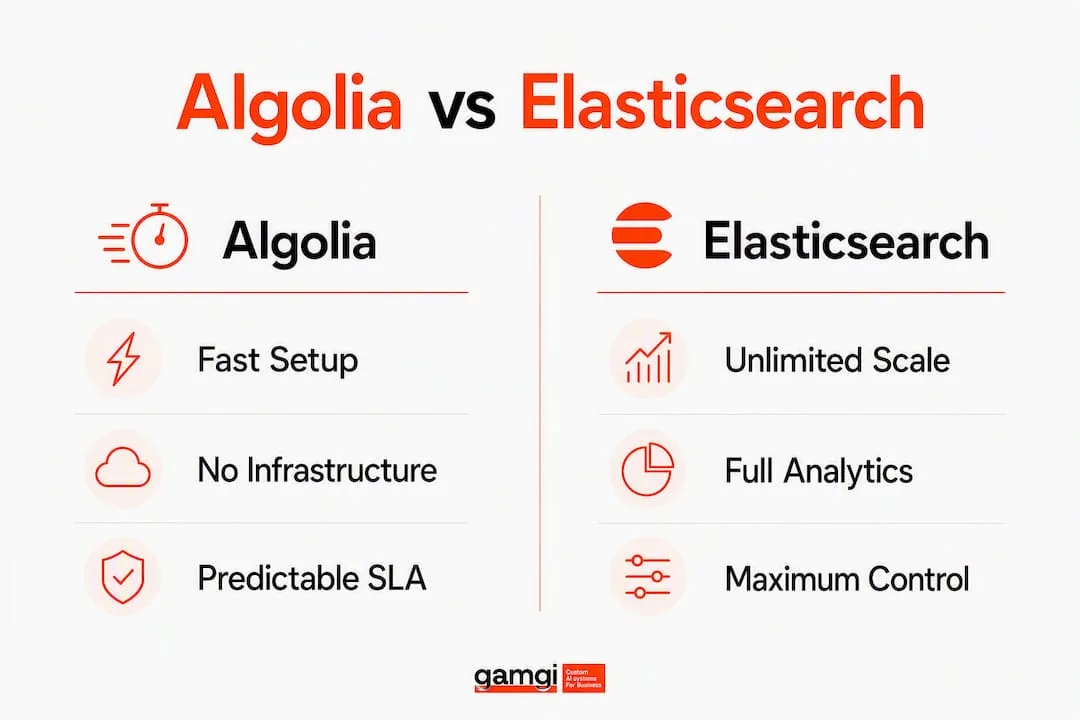
Algolia strengths: zero infrastructure overhead, built-in typo tolerance, predictable SLA, fast onboarding.
Elasticsearch strengths: unlimited scale, full analytics stack, no per-query cost ceiling, maximum control over relevance logic.
Red flag for Algolia: index growth past 128 GB per index or query volumes that push monthly bills above your infrastructure alternative.
Red flag for Elasticsearch: no dedicated search or DevOps engineer on staff. Running it without one is how teams end up with a cluster that works until it doesn’t.
When Does Algolia Give You the Fastest Path to Value?
Algolia is the right call in these patterns:
- E-commerce product search where typo tolerance, faceting, and InstantSearch UI components need to ship fast without custom front-end work.
- Customer-facing SaaS search where your users expect Google-quality results and your team can’t afford to tune a Query DSL.
- MVPs and early-stage products where proving search quality in weeks, not quarters, is the business priority.
- Multi-region deployments where you need low latency globally without managing geo-distributed clusters yourself.
Algolia setup runs from hours to a few weeks for a production environment. That’s the clearest time-to-value advantage in the category.
Pro Tip: Before you commit to Algolia’s per-query model, project your search volume at 12 and 24 months. At 5M+ searches per month, the cost curve changes sharply. Negotiate an enterprise agreement early, and make sure your contract includes data export rights so you’re never locked into a migration under pressure.
When Does Elasticsearch Pay Off Instead?
Elasticsearch earns its complexity in specific enterprise patterns. Log analytics and security monitoring are the clearest: the Elastic Stack is purpose-built for this, and Algolia simply doesn’t compete here. If your search platform also needs to power a SIEM, feed an observability dashboard, or run sophisticated aggregations across billions of events, Elasticsearch is the only serious option.

Large-scale e-commerce or content platforms with indices that outgrow Algolia’s 128 GB per-index ceiling also belong here. So do teams that need custom scoring models, complex query pipelines, or relevance logic that goes beyond what a UI-based tuning tool can express.
The operational requirement is real: you need at least one engineer who understands JVM tuning, index lifecycle policies, and cluster health. On-call coverage for a production Elasticsearch cluster is not optional.
Pro Tip: If you need Elasticsearch’s power but don’t have in-house search expertise yet, start with Elastic Cloud. It handles cluster management and gives you a managed upgrade path. You get the control without the full operational burden on day one.
What Does the Total Cost of Ownership Actually Look Like?
| Scenario | Algolia (est. monthly) | Elasticsearch (est. monthly) |
|---|---|---|
| Mid-volume: Several hundred thousand searches per month | Approximately a few hundred dollars | Lower infrastructure and partial DevOps costs |
| High-volume: Several million searches per month | Several thousand dollars | Several hundred dollars in infrastructure alone |
The high-volume scenario is where the decision usually gets made. At 5M searches per month, Algolia’s per-query billing can run four to five times the raw infrastructure cost of a comparable self-hosted cluster. What that comparison misses is the staffing cost: a search engineer in the U.S. runs $120,000-$180,000 per year fully loaded. For smaller teams, Algolia’s predictable managed fee is often cheaper than the hidden operational tax.
TCO checklist for your model:
- Monthly search volume (baseline and peak)
- Average record count and index growth rate
- Concurrency requirements at peak load
- SLA needs and acceptable downtime cost
- Current DevOps headcount and search engineering capacity
- Hiring cost versus managed service fee over 24 months
For more on scoping AI infrastructure costs, gamgi’s AI automation cost guide covers the modeling approach in detail.
How Do You Integrate Vector Search and Plan a Migration?
Vector and semantic search are now table stakes for enterprise search. Both platforms support it, but the integration path differs significantly.
- Audit your current index structure before choosing an embedding model. Document length, modality (text only vs. mixed), and language distribution all affect which model fits. For general-purpose English retrieval, mE5-L is the strongest open-source option; for highest overall quality, T3EM leads but carries API latency and per-query cost. The right choice for embeddings for RAG depends on your document types, not just benchmark scores.
- Run a prototype before committing to a migration. A parallel index on Algolia NeuralSearch or an Elasticsearch vector index with a small data slice will surface real costs faster than any spreadsheet.
- Plan for reindexing cadence. Embedding refresh, index lifecycle, and a re-ranking layer to combine semantic and signal-based ranking are consistently the most time-consuming parts of any vector migration.
- Avoid rip-and-replace. Run the new search layer in parallel, validate relevance against your existing system, then cut over by traffic percentage.
Pro Tip: Don’t pick your embedding model from a benchmark alone. Run a side-by-side evaluation on your own queries and documents. Published benchmarks rarely match real-world corpora, and the sentence transformers vs OpenAI embeddings trade-off often resolves differently on domain-specific data than on MTEB averages.
How Do You Actually Choose? The CTO Decision Checklist
Work through these before any vendor call:
- Does your team include a search or DevOps engineer who can own cluster operations? No: lean Algolia or Elastic Cloud.
- What is your go-live deadline? Under 4 weeks: Algolia. Flexible: either.
- What is your peak query volume at 18 months? Above 5M/month: model Elasticsearch TCO carefully.
- Do you need log analytics, SIEM, or observability alongside search? Yes: Elasticsearch.
- Do you have data residency or compliance requirements (HIPAA, FedRAMP)? Elastic Cloud covers both; verify Algolia’s current certifications for your specific requirement.
- Is vector/semantic search on your roadmap within 12 months? Both support it; Algolia’s NeuralSearch is faster to ship, Elasticsearch gives more control over the pipeline.
Questions to ask vendors: What is the SLA remediation process and credit structure? Can you export your full index at any time with no fee? What happens to pricing if our query volume doubles?
Red flags: vague SLA language with no credit mechanism, no published latency benchmarks for your region, inability to provide reference customers in your industry, and pricing that requires a custom quote before you can model a scenario.
Methodology and assumptions behind this comparison
All cost examples use U.S. pricing norms and assume a typical U.S. engineering rate for staffing estimates. “Scale” means production workloads above 100K searches per month. The high-volume scenario uses APIScout’s reported figures for Algolia at 5M searches per month and infrastructure-only estimates for a comparable self-hosted cluster.
“The right choice depends on team expertise, timeline, budget, and whether search must be part of a broader analytics or observability platform. Algolia suits speed and developer experience; Elasticsearch suits teams that need maximum control and scale.” - RayoSearch, 2026 In-Depth Comparison
The recommendation changes if you have a dedicated search team (shifts toward Elasticsearch) or if your AI roadmap requires custom re-ranking pipelines that go beyond what managed NeuralSearch exposes. gamgi’s case studies show how these trade-offs play out across different operational contexts.
How Do Security and Compliance Compare at the Enterprise Level?
Algolia holds SOC 2 Type II certification and supports GDPR, CCPA, and enterprise SSO via SAML. Data residency options cover the U.S. and EU. For most commercial SaaS and e-commerce use cases, that coverage is sufficient.
Elasticsearch on Elastic Cloud adds HIPAA eligibility, FedRAMP authorization (for government workloads), and field-level security with document-level access control. If your search index contains protected health information or you operate in a regulated federal environment, Elastic Cloud is the only option between the two. Self-hosted Elasticsearch gives you full control over encryption, network isolation, and audit logging, but compliance certification then falls entirely on your team to maintain.
How Mature Are the Communities and Ecosystems?
Elasticsearch has one of the largest open-source communities in enterprise software. The ecosystem includes Kibana for visualization, Logstash and Beats for data ingestion, and a deep library of connectors. Stack Overflow and GitHub activity remain high, and Elastic’s commercial support tiers are well-established.
Algolia’s ecosystem is narrower but purpose-built for search UX. InstantSearch libraries for React, Vue, and vanilla JavaScript are production-ready and actively maintained. The developer community is smaller, but TrustRadius reviews consistently highlight fast onboarding and responsive support. For teams building AI-driven search experiences, the role of AI in search rankings is increasingly shaping how both ecosystems evolve their relevance models.
How Do You Pick and Vet an Implementation Partner?
Key questions for any services partner:
- Have they shipped production search on this specific platform, not just prototypes?
- Can they show you a migration case study with timeline and cost outcomes?
- Do they own the full stack: data pipeline, index design, relevance tuning, and front-end integration?
- What does their handoff look like? Do you own the system fully after delivery?
Red flags: partners who recommend a platform before understanding your data model, partners who can’t explain their embedding model selection rationale, and anyone who proposes a full rip-and-replace without a parallel-run phase. For a broader framework on evaluating AI implementation partners, gamgi’s custom AI development guide covers the procurement criteria in detail.
Key Takeaways
Algolia is the faster path to production search; Elasticsearch is the right long-term foundation when your team has the depth to run it and your data or query volume outgrows managed SaaS constraints.
| Point | Details |
|---|---|
| Algolia for speed | Delivers sub-50ms latency and a 99.999% SLA with no infrastructure to manage. |
| Elasticsearch for scale and control | Effectively unlimited index size and full ELK observability; requires dedicated search engineering. |
| Cost inflection point | At 5M searches/month, Algolia can cost $2,400-$4,095 versus $200-$800 in infrastructure for a self-hosted cluster. |
| Vector search readiness | Both platforms support it; Algolia’s NeuralSearch ships faster, Elasticsearch gives more pipeline control. |
| gamgi’s role | gamgi runs the evaluation, builds the integration, and ships the system into your existing stack with no lock-in. |
The Decision Is Rarely About the Platform
Most teams that get this wrong don’t pick the wrong search engine. They pick the right one for the wrong reasons: choosing Algolia because it’s easier to demo, or choosing Elasticsearch because it feels more “enterprise.” The actual decision driver should be operational capacity, not feature lists.
A team without a search engineer who can own cluster health, relevance tuning, and on-call response has no business running self-hosted Elasticsearch in production, regardless of how attractive the cost model looks on a spreadsheet. Conversely, a team that projects 10M searches per month within 18 months and signs a standard Algolia contract without modeling the cost curve is setting up a painful renegotiation.
The teams gamgi works with most often arrive at this decision after a failed internal prototype: they built something that worked in staging and broke under real load, or they underestimated the reindexing complexity when adding vector search. The fix is almost never switching platforms. It’s fixing the integration architecture and the embedding pipeline design before the cutover.
For most clients, a short prototype on Algolia or a managed Elastic Cloud proof-of-concept surfaces the real migration costs faster than any internal build. Start there.
What gamgi Builds for Teams Evaluating Search Platforms
Choosing between Algolia and Elasticsearch is the easy part. Designing the embedding pipeline, the re-ranking layer, the index lifecycle policy, and the integration with your existing data stack is where most implementations stall. gamgi builds that entire system, from the initial AI audit through to production deployment, integrated with the tools you already run.
The audit covers your current data model, estimated TCO for both platforms at your projected volume, a migration plan with risk checkpoints, and a prototype recommendation you can validate before committing. You own everything delivered. No lock-in, no black boxes.
If your team is weighing this decision now, book an audit with gamgi and get a clear recommendation backed by your actual operational constraints, not a vendor’s sales deck.
Authoritative sources and further reading
- APIScout: Algolia vs Elasticsearch Search API Showdown 2026 - latency benchmarks, SLA data, and cost scenario examples at 5M searches/month.
- RayoSearch: 2026 In-Depth Comparison - deployment timeline guidance and decision framework for team expertise and budget.
- Reintech: Comparing Search Solutions - language analyzer counts, index size limits, and relevance tuning differences.
- TrustRadius: Algolia vs Elasticsearch - developer ergonomics and real-user review data.
- Zilliz Learn: Best Embedding Model for RAG 2026 - embedding model trade-offs for vector search integration.
- arXiv: Practical Benchmarking and Decision Framework for Embedding Models - mE5-L and T3EM retrieval benchmarks, chunking strategy guidance.
- gamgi case studies - production implementations showing search and AI integration outcomes across industries.