HR Onboarding Automation: A Practical Guide for 2026
Discover how HR onboarding automation can streamline your hiring process, reduce time-to-productivity, and free up valuable HR resources.

HR onboarding automation turns the hire-to-first-day checklist into repeatable, measurable workflows that cut manual work and accelerate time-to-productivity. If you lead HR, talent operations, IT identity management, or a business unit planning to scale hiring without adding proportional headcount, this guide is written for you. A published case study reports a 9% reduction in total hiring and onboarding time after automating onboarding workflows, and industry analyses consistently show that a large share of HR capacity disappears into administrative tasks that software can handle. The sections below give you a prioritized roadmap: quick wins first, integration architecture next, KPIs to track, and a real consultancy-led rollout to learn from.
- HR and IT teams lose significant capacity to manual data entry, document chasing, and access provisioning that automation can eliminate.
- Automation covers the full hire-to-productivity lifecycle: preboarding, identity provisioning, device setup, document collection, payroll enrollment, training assignment, and manager checklists.
- Quick wins (I-9 checks, e-signatures, account provisioning) can go live in weeks; complex conditional workflows follow in later phases.
- gamgi delivers custom AI systems with an audit-first approach, typically reaching pilotable automations within six weeks.
Table of Contents
- Why manual onboarding keeps failing your new hires
- What onboarding automation actually means
- Which onboarding tasks should you automate first?
- What automation actually delivers for your business
- How to roll out onboarding automation without breaking things
- What to look for in employee onboarding software
- How to measure whether your automation is working
- What goes wrong and how to avoid it
- How a consultancy-led rollout actually looks: a gamgi example
- How to train HR and managers on the new system
- Data privacy and security in onboarding automation
- How to personalize onboarding workflows by role and department
- Vendor evaluation criteria beyond the feature checklist
- Key Takeaways
- The part most guides skip: why the audit matters more than the tool
- What gamgi can do for your onboarding automation in six weeks
- Useful sources for going deeper
Why manual onboarding keeps failing your new hires
Manual onboarding is a coordination problem disguised as a paperwork problem. HR sends a welcome email, IT waits for a ticket, payroll needs a signed form that is still in someone’s inbox, and the new hire sits on day one without a laptop login or a benefits enrollment link. Each handoff is a potential failure point.
The core issue is fragmented systems. Most organizations run their ATS, HRIS, payroll platform, and identity provider as separate tools with no automated data flow between them. A recruiter closes a req in the ATS, then someone manually re-enters the hire’s details into the HRIS, then payroll, then IT’s provisioning queue. Every re-entry step introduces errors and delays.
The most common pain points:
- Delayed system access on day one (laptop not provisioned, email not created)
- Missing or incomplete I-9 and tax documents
- Duplicated data entry across three or more systems
- Inconsistent training assignments by role or department
- No visibility into where a new hire is in the onboarding checklist
- Manager tasks falling through the cracks because there is no structured prompt
Industry analyses consistently show that a large portion of HR time goes to administrative work rather than strategic people programs. That is capacity that could go toward retention conversations, culture building, and workforce planning.
Pro Tip: Before you automate anything, map the current process end-to-end on a whiteboard. You will almost certainly find steps that exist only because “that’s how we’ve always done it.” Eliminate those first. Automating a broken process just makes the mistake happen faster.
What onboarding automation actually means
Onboarding automation is the use of triggered workflows, conditional logic, and system integrations to move a new hire through the hire-to-productivity lifecycle without manual intervention at each step. A trigger (an offer accepted in the ATS, for example) fires a sequence: HRIS record created, payroll enrollment initiated, IT provisioning ticket generated, welcome email sent, manager checklist activated.
The scope is wider than most HR teams initially assume:
- Preboarding: Offer letter delivery, e-signature collection, I-9 initiation, background check triggers
- Identity and access provisioning: Account creation via SCIM, SSO group assignment, role-based permissions
- Device provisioning: MDM enrollment, hardware request routing, software license assignment
- Document collection: Tax forms, direct deposit setup, policy acknowledgments
- Payroll and benefits: Enrollment triggers, deadline reminders, confirmation tracking
- Training assignment: LMS enrollment by role, department, or location
- Manager checklists: Automated task lists with SLA reminders for first-day, first-week, and 30-day milestones
- Analytics: Completion rates, time-per-task, bottleneck identification
What automation should not do: replace the human moments that actually make a new hire feel welcome. A Slack message from the team, a coffee chat with the manager, an onboarding buddy assigned before day one. These are high-value, low-volume interactions. Protect them.
Pro Tip: Automate the logistics. Keep the relationship-building human. The clearest sign an onboarding program has over-automated is when new hires describe their first week as “efficient but cold.”

Which onboarding tasks should you automate first?
Prioritize by volume and complexity. High-volume, low-complexity tasks deliver the fastest ROI and the lowest implementation risk. Here is a ranked order:
- Document collection and e-signature - Every hire needs the same forms. Automate delivery, signature capture, and storage the moment an offer is accepted.
- I-9 verification - Trigger the I-9 workflow automatically; route Section 2 completion to the designated HR reviewer with a deadline reminder.
- Payroll setup - Push hire data from the HRIS to payroll automatically; trigger direct deposit and tax form collection without manual re-entry.
- Benefits enrollment - Send enrollment links with role-appropriate plan options and deadline reminders; confirm completion automatically.
- Account provisioning - Use SCIM to create accounts in your identity provider the moment the HRIS record is confirmed; assign SSO groups by role.
- Device provisioning - Trigger an MDM enrollment request and hardware order via API or webhook when the start date is confirmed.
- Training assignment - Push role-based LMS enrollments automatically; set completion deadlines and send reminders.
- Welcome communications - Automate a preboarding email sequence (offer confirmed, first-day logistics, team introduction) without HR drafting each one.
The integration chain that makes this work:
- ATS fires a webhook when an offer is accepted
- HRIS receives the hire record via API
- Payroll, SSO, and MDM pull from the HRIS as the system of record
- LMS receives role and department data to assign training
- All confirmations write back to a central dashboard
Connector types to know: SCIM for identity provisioning, SAML for SSO federation, REST APIs for system-to-system data, and webhooks for event-driven triggers. Integrating payroll, HRIS, and device management into a single connected workflow is what eliminates the manual re-entry that causes most onboarding errors.
Reserve for later phases: complex role-based access for regulated environments, cross-country compliance workflows, and conditional logic that depends on manager approval chains. Get the basics running cleanly first.
What automation actually delivers for your business
The business case for digital employee onboarding is not abstract. A published case study reports a 9% reduction in total hiring and onboarding time after automating onboarding workflows, which translates directly to HR capacity recovered and new-hire productivity gained earlier.
Core benefits:
- Faster time-to-productivity: New hires arrive with accounts active, devices ready, and training queued. They contribute sooner.
- Fewer errors: Eliminating manual re-entry between ATS, HRIS, and payroll removes the primary source of onboarding data mistakes.
- Improved compliance: Automated I-9 tracking, document deadline reminders, and audit trails reduce legal exposure.
- Better new-hire experience: A new hire who gets a laptop login on day one and a structured first-week plan forms a better impression of the organization.
- Manager bandwidth recovery: Automated checklists and reminders mean managers spend time on coaching, not chasing paperwork.
Beyond the measurable metrics, automation creates scalability. A company that hires 10 people a month and a company that hires 100 can run the same onboarding quality with the same HR team size. That is the real gain. Consistent workflows also protect employer brand: every new hire gets the same quality experience regardless of which recruiter or HR coordinator handled their file.
How to roll out onboarding automation without breaking things
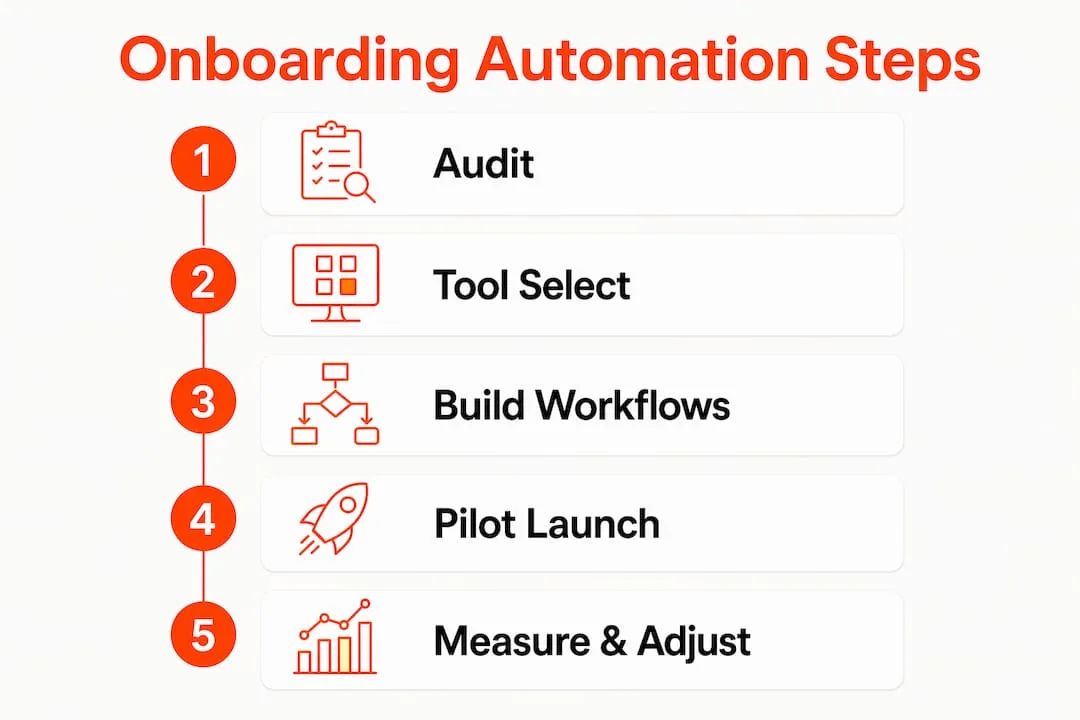
A phased rollout reduces risk and builds organizational confidence. Here is a seven-step roadmap:
- Audit current processes - Map every step from offer acceptance to day-30 milestone. Identify manual handoffs, re-entry points, and steps with no clear owner.
- Prioritize quick wins - Select two or three high-volume, low-complexity tasks (document collection, account provisioning) for the pilot.
- Select your integration approach - Decide between native HRIS workflows, an iPaaS platform like Workato, or RPA tooling based on your existing stack and IT capacity.
- Build pilot workflows - Configure in a sandbox environment. Test every conditional branch, not just the happy path.
- Test and measure - Run the pilot with one department or role for two full hire cycles before expanding. Track completion rates and error rates from day one.
- Train HR and managers - Run live walkthroughs, not just documentation. Managers need to know what the system handles and what still requires their input.
- Scale with governance - Define ownership of each workflow, set SLA timers on human approval steps, and establish a change-control process for workflow edits.
Realistic timeline for a typical pilot: Weeks 1-2 for process audit and tool selection; Weeks 3-4 for workflow build and sandbox testing; Weeks 5-6 for pilot launch with a single department. Measurable outcomes typically appear within the first two hire cycles.
Pro Tip: Design your rollback plan before you go live. Know exactly which manual steps to reactivate if a workflow fails mid-hire. A new hire stuck in a broken automation is worse than a new hire in a slow manual process.

Change management matters as much as the technical build. Communicate to managers what is changing and why, update your onboarding knowledge base, and create a feedback channel so HR can catch workflow gaps quickly.
What to look for in employee onboarding software
Evaluate tools by capability, not brand recognition. The checklist that matters:
- Connectors and integrations: Does it connect natively to your ATS, HRIS, payroll, SSO, MDM, and LMS? How many require custom API work?
- Workflow builder: Is it low-code or no-code? Can HR configure changes without an IT ticket?
- Conditional logic: Can workflows branch by role, department, location, or employment type?
- User roles and permissions: Can you restrict who edits workflows vs. who monitors them?
- Audit trails: Does every automated action log a timestamped record for compliance review?
- E-signature and document storage: Are signed documents stored securely with access controls?
- SSO/SCIM support: Can it provision identities automatically without manual IT intervention?
- MDM integrations: Does it trigger device enrollment via your MDM platform?
- LMS connectivity: Can it push training assignments based on role data from the HRIS?
- Reporting and analytics: Can you see completion rates, bottlenecks, and time-per-task in a dashboard?
Automation approach comparison:
| Approach | Best for | Trade-offs |
|---|---|---|
| Native HRIS workflows | Teams already on a modern HRIS with built-in automation | Limited to what the HRIS supports; harder to extend |
| iPaaS (e.g., Workato) | Multi-system environments needing flexible connectors | Requires configuration expertise; Gartner-reviewed for enterprise use |
| RPA (e.g., Automation Anywhere) | Legacy systems with no API access | High maintenance; brittle when UIs change |
| Custom AI workflows | Organizations needing tailored logic across unique stacks | Requires a build partner; highest flexibility and ROI ceiling |
Questions to ask during vendor demos: What is the SLA for connector updates when a third-party API changes? Where does data reside, and can you choose a US-only data region? What does the support model look like post-implementation?
How to measure whether your automation is working
Track these KPIs from the first pilot cohort:
| KPI | What it measures | Sample target |
|---|---|---|
| Time-to-productivity | Days from start date to full role contribution | - |
| Onboarding completion rate | % of required tasks completed by day 30 | - |
| Document completion time | Hours from offer acceptance to all docs signed | - |
| Provisioning success rate | % of accounts/devices ready on day one | - |
| HR time saved per hire | Hours of manual work eliminated per new hire | Measure against pre-automation baseline |
| Error rate | Data mismatches caught post-hire | Target near zero for re-entry errors |
Quick ROI formula: Multiply your average HR hourly cost by the hours saved per hire, then by annual hire volume. If automation saves two hours of HR time per hire at $45/hour and you hire 200 people per year, that is $18,000 in recovered capacity annually, before counting manager time, IT provisioning hours, or the cost of onboarding errors.
Pro Tip: Set your baseline before you launch. Pull the current numbers for document completion time and provisioning success rate from your last 20 hires. Without a baseline, you cannot prove the improvement.
What goes wrong and how to avoid it
The most common implementation failures are predictable:
- Automating a broken process: If your current I-9 workflow has unclear ownership, automating it just makes the confusion faster. Fix the process first, then automate it. Practical guidance on this is consistent: audit before you build.
- Poor data hygiene: Automation depends on clean, consistent data in your HRIS. Duplicate records, inconsistent job title formats, and missing fields will break conditional logic. Run a data audit before connecting systems.
- Over-automation: Removing every human touchpoint in the name of efficiency produces a cold, transactional experience. Build human checkpoints into the workflow as required steps, not optional add-ons.
- Integration gaps: An ATS that does not push hire data to the HRIS automatically creates a manual re-entry point that undermines the whole chain. Map every gap before you build.
- No governance: Workflows edited without change control create version conflicts and compliance gaps. Assign a workflow owner and require approval for edits.
Manager playbook for automated onboarding:
- Confirm your automated checklist tasks are complete before the new hire’s start date
- Schedule a personal welcome call or message outside the automated sequence
- Own the 30-day check-in conversation; the system will remind you, but the conversation is yours
- Flag any workflow errors to HR immediately so they can be corrected before the next hire
How a consultancy-led rollout actually looks: a gamgi example
Challenge: A mid-size professional services firm was running onboarding across four disconnected tools: an ATS, an HRIS, a payroll platform, and a shared drive for documents. Every hire required manual data entry in at least three systems, and IT provisioning averaged two days after start date.
Approach: gamgi conducted an upfront AI audit to map every handoff and identify the highest-ROI automation targets. The audit surfaced three quick wins: automated HRIS record creation from ATS data, triggered payroll enrollment, and SCIM-based account provisioning. A custom workflow connected the systems via API and webhook, with conditional logic for full-time vs. contractor onboarding paths.
Outcome: Pilotable automations were live within six weeks. Document completion time dropped from five days to under 24 hours. IT provisioning moved from two days to same-day. HR reported recovering roughly four hours of manual work per hire.
Lessons learned:
- Start with the data layer: clean HRIS records are the foundation everything else depends on
- Involve IT and payroll in the design phase, not just HR
- Run the pilot with a single department for two full hire cycles before scaling
- Build manager training into the rollout timeline, not as an afterthought
gamgi’s case studies show this pattern across industries: audit first, build targeted integrations, measure outcomes, then scale.
How to train HR and managers on the new system
Training is where automation projects quietly fail. HR teams that understand the workflow logic can troubleshoot edge cases; those who only know “click here” create support tickets for every exception.
Run live walkthroughs for HR coordinators that cover the full workflow: what triggers each step, what happens when a condition is not met, and how to manually intervene when needed. Documentation matters, but a recorded walkthrough that HR can rewatch is more useful than a static PDF.
For hiring managers, keep it simple. They need to know three things: what the system handles automatically, what requires their action, and how to flag a problem. A one-page reference card covering their checklist items and escalation path is more effective than a 20-slide deck.
Schedule a 30-day post-launch review with both groups. Collect friction points, update the knowledge base, and adjust workflows where the process revealed gaps. The first cohort of hires through an automated system always surfaces edge cases the sandbox did not.
Data privacy and security in onboarding automation
Onboarding workflows handle some of the most sensitive employee data your organization collects: Social Security numbers, bank account details, health benefit elections, and identity documents. The security architecture matters as much as the workflow logic.
For identity provisioning, combine SCIM for automated account creation with role-based access controls that limit what each account can access from day one. Every provisioning action should write to an audit trail that compliance teams can review. Microsoft Entra provides a well-documented framework for automating identity lifecycle management with built-in governance controls.
Data residency is a real consideration for US-based organizations with employees in multiple states. Confirm that your automation platform stores data in US regions and that any third-party connectors meet your data processing requirements. For document storage, use encrypted repositories with access controls tied to HR roles, not shared drives.
The Microsoft tutorial on automating onboarding tasks covers the identity governance side in detail and is worth reviewing before you configure provisioning workflows.
How to personalize onboarding workflows by role and department
A single onboarding workflow for every hire is a shortcut that creates problems. A software engineer needs different system access, training, and equipment than a sales rep or a finance analyst. Conditional logic is what makes personalization at scale possible.
Build your workflows around a role taxonomy stored in the HRIS. When a hire record is created, the role field triggers the appropriate branch: engineering hires get GitHub access and a development environment setup; sales hires get CRM access and product training; finance hires get ERP access and compliance training. The same trigger, different outcomes.
Location adds another layer. A hire in California may need state-specific tax forms and a different benefits package than a hire in Texas. Build location-based conditions into your document collection and benefits enrollment workflows from the start, not as a retrofit.
The MIT Sloan Review research on getting new hires up to speed points to role clarity and early task assignment as the strongest predictors of time-to-productivity. Personalized onboarding workflows deliver both automatically.
Vendor evaluation criteria beyond the feature checklist
Features get you to a shortlist. These criteria separate the vendors that work in production from the ones that looked good in the demo:
Support model: What happens when a connector breaks after a third-party API update? Does the vendor fix it, or do you? Enterprise platforms typically offer SLA-backed connector maintenance; smaller tools often do not.
Scalability: Can the platform handle 10x your current hire volume without a pricing cliff or performance degradation? Ask for reference customers at your target scale.
User experience for non-technical HR staff: A workflow builder that requires developer support for every change is not a low-code tool in practice. Test it with an actual HR coordinator during the demo, not just with IT.
Vendor stability and roadmap: A platform that is not investing in AI-driven personalization and analytics will fall behind quickly. Ask about the product roadmap for the next 12 months.
G2 reviews for Workato consistently highlight ease of integration as a differentiator, but also flag that initial configuration requires technical resources. That trade-off is typical of iPaaS platforms and worth factoring into your implementation budget.
When you are evaluating whether to hire an AI consultant or build in-house, the honest answer usually depends on how many custom integrations your stack requires and how fast you need to move.
Key Takeaways
Automating onboarding delivers measurable time savings and error reduction only when built on clean data, integrated systems, and a phased rollout that starts with quick wins.
| Point | Details |
|---|---|
| Start with a process audit | Map every manual handoff before building; automating a broken process amplifies the problem. |
| Quick wins first | Document collection, I-9 triggers, and account provisioning deliver fast ROI with low implementation risk. |
| Measure from day one | Track provisioning success rate, document completion time, and HR hours saved against a pre-automation baseline. |
| Personalize by role | Use conditional logic in your HRIS to branch workflows by role, department, and location from the start. |
| gamgi’s audit-first approach | gamgi conducts an upfront AI audit and delivers pilotable automations within six weeks, with measured outcomes. |
The part most guides skip: why the audit matters more than the tool
Most onboarding automation content focuses on which platform to buy. That is the wrong starting point. The tool is almost never the constraint. The constraint is almost always the process underneath it.
Organizations that jump straight to software selection end up configuring workflows that mirror their existing manual steps, including the broken ones. They automate the five-day document chase instead of fixing why documents take five days. They provision accounts based on a role taxonomy that has not been updated in three years. The automation runs perfectly and produces the wrong outcome.
The audit-first approach that gamgi uses is not a sales tactic. It is the only reliable way to know which automations will actually move your KPIs. Two weeks of process mapping before any tool selection typically surfaces three to five workflow changes that would have caused rework post-launch. That is months of debugging avoided.
The other thing most guides understate: change management is harder than the technical build. HR coordinators who feel like automation is replacing their judgment, not their busywork, will find ways to work around it. Managers who do not understand what the system handles will duplicate effort or skip their checklist tasks. The technical rollout is the easy part. Getting people to trust and use the system is where the real work is.
What gamgi can do for your onboarding automation in six weeks
Most organizations know they need to automate onboarding. The gap is between knowing and having a working system. gamgi closes that gap with an audit-first engagement that starts by mapping your current hire-to-productivity workflow, identifying the highest-ROI automation targets, and delivering a custom AI roadmap before any build begins.
A typical first engagement runs six weeks: two weeks for the audit and integration design, two weeks for workflow build and sandbox testing, and two weeks for pilot launch and measurement. You come to discovery with your current tool stack, a list of your most painful manual steps, and your hire volume by role. gamgi handles the integration architecture, the conditional logic, and the training handover.
The result is a working pilot, not a slide deck. If you are ready to stop re-entering hire data and start measuring onboarding outcomes, start with an AI audit or review gamgi’s capabilities to see what a custom implementation looks like for your stack.
Useful sources for going deeper
These resources are worth bookmarking for the procurement and build phases:
- MIT Sloan Management Review - Getting New Hires Up to Speed Quickly: Research-backed analysis of what actually drives time-to-productivity; useful for setting KPI targets and making the business case internally.
- Microsoft Entra - Automate Onboarding Tasks Tutorial: Step-by-step implementation guide for identity lifecycle automation; essential reading before configuring SCIM provisioning or SSO workflows.
- Microsoft Entra Identity Governance: The primary platform reference for automated identity provisioning, access reviews, and audit trails in Microsoft environments.
- Gartner Reviews - Workato: Peer reviews from enterprise buyers on iPaaS configuration, connector reliability, and support quality.
- G2 Reviews - Workato: Practitioner-level feedback on ease of use, integration depth, and real-world implementation timelines.
- HBR - Every New Employee Needs an Onboarding Buddy: Evidence for preserving human touchpoints alongside automated workflows; useful for change management conversations.
- HCI - Onboarding and Retention Research: Whitepaper connecting onboarding quality to retention outcomes; supports the business case for investment.
- Dan Fe - Practical Onboarding Automation Guidance: Practitioner-written guidance on budgeting, quick-win selection, and avoiding the most common automation mistakes.
Use the Microsoft Entra tutorial during your technical design phase. Pull the Gartner and G2 reviews during vendor shortlisting. Return to the MIT Sloan and HCI research when you are building your internal business case.